
Proof Beyond Reasonable Doubt 2008 - page 1
Mike McNamee revisits the topic after a five year gapWe last covered the topic of proofing back in November 2003. In the intervening period much has changed both in the printing industry and in proofing methods. The main change in the printing industry has been the move to 'computer-toplate' technology. With this method no films are made as an intermediate stage to making the actual printing plate. It was these intermediate films that were used to make 'analogue proofs' and so CtP has effectively killed the analogue proofing sub-industry. Analogue proofs are typified by the Chromalin and creating such a proof could take the skilled operator between 30 minutes and one hour. It was typical to charge around £135 for a Chromalin, a nice little earner for the printer. Chromalins have all but disappeared from the scene, indeed we have not had one presented at Professional Imagemaker since 2003! They have been replaced by the digital proof in various guises and this has been made possible by the rapid advances made in inkjet printing technology and the implementation of colour management throughout the printing workflow. One thing that does not seems to have changed is the occasional incident of trouble in getting a match between the content-creator's idea of a colour and that which flies off the press at the end of the day. Although printing technology has become far more sophisticated it still relies on the adjustment of the inking levels across the plate to create a match between the proof and the output – the eye remains quite important for quality work and attentiveness on the part of the press floor operator is still quite critical.
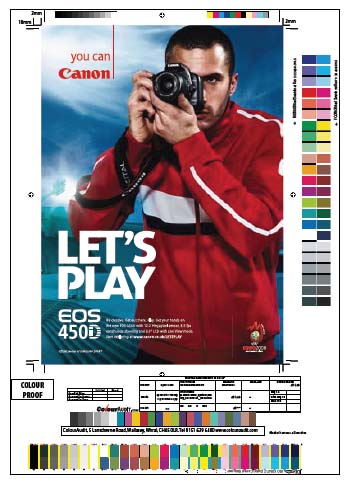
While all these changes have been taking place on the printing side, photography has also been changing. Despite the protests of the die-hards, digital has taken over. We have not scanned a transparency at Professional Imagemaker for so long we cannot even remember the last time we did so. After some initial resistance from the printing industry they have now been forced to accept digital files as the norm and abandon their lucrative little earner of drum scanning. The printing industry always claimed that they had to 'do the scanning in house' because they were the experts and 'knew how to do it'. This was only partly true and driven by a desire to cling onto the revenue stream. The downside for the photographers is that they are now often required to get the images ready for press (and also carry the can if they do not reproduce as expected), a task they are rarely, if ever, paid for. The speed, accuracy and relatively low cost of quality proofing means, at least at the higher end, that photographers can even proof their own images and show the printer what they expect. However, if the image is to be set onto a page with other images and graphics it is normal for the graphic designer to proof the entire layout. Modern colour management allows for images from a variety of sources to sit on the InDesign page , each controlled by its own icc profile.
Despite all these changes, the quality of both printing and proofing has generally risen, although we still see some really poor stuff, particularly from the Far East and China. The labour rates out in China, for example, are so low that they can afford to wet proof jobs. However, at the lower end of the market we see examples of them taking ferricyanide to printing plates to tweak the colour balance, a practice we thought had left the scene totally!
TYPES OF PROOF
The terminology of proofing has remained similar since 2003 and it is still valid to repeat the heading we used last time, although the emphasis has obviously changed. Proofing is all about the integrity of an image or document. Integrity can mean the words, the colours, the quality, the arrangement on the page or combinations of these. A job is scrapped if the picture is the wrong colour or if it is upside down – proofing is intended to spot either error, before the final job is run. In DTP, the very simplest proof is a copy of the text to ensure that the spelling is correct and that the words actually make sense. Other variants of proofs are more complex and fall into two categories, analogue and digital proofs.
Analogue Proofing
In analogue proofing, the same type of technology is used to create the proof as will be used to run the final job on a press. From the DTP layout, an Image Setter is used to create films with which to make the printing plates or to make the plates directly (in the socalled Computer to Plate, CtP, technology). To analogue proof, these same films or plates are used to make a proof. The two main methods were the Chromalin Method or WetProofing. The Chromalin system was superseded by WetProof and both are Dupont products. In this process, the actual films are used to create a single proof in a process which takes about an hour. In traditional wet proofing the actual plates are used on a slow, manual press, again taking lots of labour. Wet proofing is about as close as it is possible to get to running the real job as the same plates, inks and paper stock may be used. Progressive proofs can be made by this method which are seven paper proofs showing:
Yellow,
Yellow+Magenta,
Magenta,
Cyan,
Cyan+Magenta+Yellow,
Black,
4-colour.
Progressives enable the press operator to check the output from each part of the process and compare it by densitometer readings.
The main advantage of analogue proofing is that it reveals problems of moiré fringing which occur from the interaction between the pattern of half-tone dots and the image structure. Obviously with a proofing method that does not exactly mimic the half tone structure no warning of moiré will be flagged. There were a number of proofers which accommodated the need to check the half-tone structure, the most common of which was the IRIS proofer. It was the IRIS proofer which started the inkjet revolution, particularly for fine art limited edition printing. The joke at the time was that the technician who fettled the IRIS was always at the staff Christmas lunch because he was there for the rest of the year anyway, repairing the ever-petulant system!
Analogue Proofs thus use the same technology as the printing press and usually employ the same separation films and/or plates or both. Digital Proofs use a machine other than the press to mimic press behaviour, providing a cheaper and now more reliable method of predicting the outcome from the press.
Contract Proofs
A contract proof is one which is 'signed off' as representing the final output, ahead of giving permission to run the whole job. The press operator retains the contract proof and the print run is matched to it. In the case of any dispute, the contract proof provides tangible evidence of what everybody signed up to, at the outset. Contract proofs tended only to be employed on high value, high prestige or large run jobs, mainly because of the cost of making them. Today a contract proof can be made at the same speed as any other inkjet print, it is only the colour precision which differentiates it from any other inkjet proof. Because of their importance and prevalence we cover them separately later in this feature.
Scatter Proofs
If a multi-page document contains a small number of randomly placed images these are sometimes gathered together on a single sheet and proofed on their own while the remainder of the document is proofed 'for position only', ie to check text and that all the pictures are in the correct place and orientation. FPO’s are often made on desktop laser prints.
Page Proofs Page proofs come in two kinds, 'Reader Spreads' which show what the reader will see in the bound document and 'Imposition Proofs'. If you take the staples out of a magazine then the single sheet of paper (usually 2xA4, printed both sides) shows you what an imposition proof looks like. Thus you will find in Professional Imagemaker that page 15 is on the same proof as say page 22, although because we are now perfect bound, all pages are trimmed. There is an additional complication that we sometimes also print both sides of a sheet at the same time. Seeing the imposition proof enables the press operator to allow for an image on one page 'robbing' ink from the picture on the same imposed page. The 'tracking' as it is called is tweaked to make the best optimisation of the two pages.
Digital Proofs
This is a terminology that has become confused as both low-grade and high-grade proofs may both be printed using inkjet technology. It should therefore be treated with caution and if somebody is using the phrase you have to ask them to clarify just what they mean by it.
On Screen – Soft Proofing
In 2003, this was a relatively new feature, introduced in Photoshop 6 and onwards. Assuming that the relevant profile is available in the 'color' folder, Photoshop can access it and present, on screen, a quite accurate impression of how an image will print with that profile/ink/paper combination. It is turned on by clicking View>Proof Colors>Custom; then select the profile from the drop-down menu. If your CMYK working space is, for example, Europe Press 2 and you wish to soft proof to that standard then clicking Proof Working CMYK or simply Ctrl-Y will produce the result. You may even compare different options for output by clicking Window>Document>New Window. This opens a new view of the current image, which can be soft proofed with a different profile.
Perfect representation of an output is not possible because screens and paper are distinctly different ways of displaying images. It is nevertheless possible to obtain an accurate idea of how an image will behave when it is printed. This assumes that your screen is calibrated and is displaying at the same colour temperature as your viewing area. Pre-press standard is D50 (ie 5000°K) but other standards use D65 (6500°K). If you do not adjust your monitor, it is quite likely to be running at 9500°K and will be very blue. Until your eyes get used to it, D50 will look quite yellow compared to D65. Of greater importance to viewing is actually the illumination level. Screens used to be quite dark (think about how poorly a monitor lights a room on its own) and a transparency to be matched should be lit to the same level. On the other hand ISO standards for 'proof viewing' call for very high illumination levels (1,500 to 2,500 lux compared to normal office lighting levels of 200 lux). At the same time the standard calls for near darkness when adjusting on-screen images (32 lux). You certainly can’t maintain both in the same room as the proofing level will flood light everywhere! Some experts recommend that you do not place a transparency viewer and monitor side by side but force the user to turn away by 90° to make the comparison. Generally the less expensive LCD monitors that have totally replaced CRT technology since 2003 produce too much luminance (up to 450 cd/m2 compared with the requirement of 95cd/m2). It is only after you invest more than about £750 that you get a monitor with sufficiently good luminance control.
Fine Art Proofing
It is arguable whether this topic should be included here. However, for completeness, in the world of fine art and limited edition printing they have their own terms and meanings for proofs. A printer’s proof is retained by the printing service provider, for reference when additional limited edition prints are called up, the so-called 'print on demand'. The printer’s proofs may also include the prints made while the image is being adjusted to the satisfaction of the artist. The final proof (ie the one which is accepted as the final version) is called a BAT from the French bon à tirer or 'good to pull or print'. This proof can be an inkjet print, a giclée, Iris or silk screen. An artist’s proof is one of a small number retained by the artist, which are not included in the count of the limited edition. Artists' proofs are not normally sold but should the artist become very famous the cache of having something which is different can inflate the value of the proof – a bit like the pencil sketches of the revered and the famous really!
Printers such as the Epson 3800, 4880, 7880 and 9880 will proof and create fine art output.
Online Proofing
All of the types of proofing discussed above should not be confused with the other services that have appeared in the last five years, typified by the expression, 'online proofing'. Instead of the photographer slugging out a proof album to very quickly present to their client, ahead of the main album, online proofing usually provides a web-based service for showing the 'proofs' on the web so that all the guests (and not just the bride and groom) can have access to the pictures. This also enhances additional print sales (claims of as much as £300 per wedding have been bandied about).
Find the Membership package for you:

Society of International Media & Press Photographers (SIMPP) is a trading name of BPPA Ltd
Clwyd Chambers, Clwyd Street, Rhyl, Denbighshire, LL18 3LA, UK
BPPA Ltd Company Reg 0392 2894
VAT number 790 4289 05
Tel: 01745 356935
Corporate Partners



Newsletter
Subscribe to the Societies Newsletter. Subscribe here.
Privacy. - Partner Societies - London Photography & Video Show - Europe's Largest 'All-Welcome' Photographic Convention