
Adobe Creative Suite CS4 - Design Premium
A more successful stitch was McMullin's set of the London Thames scene. This has more hard detail for the program to get its teeth into and a really top-class stitch was created in 1m19s. This was a 167MB file from the seven Nikon D3 files, with an inkjet print size of 76 x 24 inches, before interpolation.

Spring-Loaded Tools
Provided you know (or are prepared to learn) the shortcut letters for the tools, this can be a fast way to move about in Photoshop. Normally you have to decide to stop using a tool, mouse over to the Toolbar and select another. With CS4, you remain on the first tool and tap and hold the shortcut letter of the new tool which becomes active as long as you keep the letter key depressed. Again this is easier to do than to write about, but is very nice to work with.
PHOTOSHOP KEY POINTS
Since writing the initial part of this review we have been using Photoshop CS4 in day-to-day activities. The faster 64-bit operation is a real boon, making for a very pleasant working environment. Upgrading decisions could wait unless you are able to exploit the faster operations by upgrading your system or if you need to open the latest RAW camera files. The program seems to be bug-free, we have not had any issues with machine stalls or the like.
ILLUSTRATOR CS4
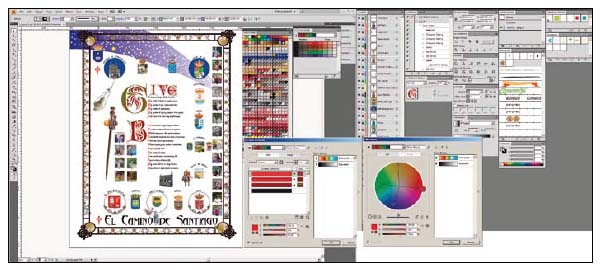
The killer feature in CS3 Illustrator was the implementation of Live Colour, with its ability to recolour artwork in accord with the harmony rules of Kuler. This has use in graphic design (for rapidly creating options) but also has implications for wedding album page design. For CS4 the killer and long-awaited feature is multiple art boards. Previously, Illustrator has been a one-page-at-a-time program and lagged behind both CorelDRAW and Macromedia Freehand in this respect. Adobe bought Macromedia, but has taken quite a long time to get around to migrating this 'multi-page' feature from Freehand.
Illustrator is a complex program, as difficult to master as Photoshop and probably even harder at first. For the social photographer the only use we can think of is for preparing bespoke front sheets to albums in, say, illuminated capitals, and for exploiting the charms of Kuler in harmonising the colours across an album. This could be more powerful than might at first appear. Suppose you have designed an illuminated poem for an album, which you proudly show off to potential new client-couples. Now suppose they request a similar treatment for their album but you have styled the colour quite differently. This is a pain to reconstruct in Photoshop but a doodle in Illustrator, the work of seconds in fact. Now you can present a bespoke page for each couple with very little effort – your investment in learning Illustrator is suddenly paid for!
For a photographer, then, the potential uses for Illustrator are limited to:
1. Album design and colour selection
2. Illuminated pages to front an album
3. Design of business logos and stationery
4. Poster design
5. Brochure design
Page 1 : Page 2 :
Page 3 : Page 4 :
Page 5 : Page 6 :
Page 7
Find the Membership package for you:

Society of International Media & Press Photographers (SIMPP) is a trading name of BPPA Ltd
Clwyd Chambers, Clwyd Street, Rhyl, Denbighshire, LL18 3LA, UK
BPPA Ltd Company Reg 0392 2894
VAT number 790 4289 05
Tel: 01745 356935
Corporate Partners



Newsletter
Subscribe to the Societies Newsletter. Subscribe here.
Privacy. - Partner Societies - London Photography & Video Show - Europe's Largest 'All-Welcome' Photographic Convention