
Adobe Creative Suite CS4 - Design Premium
These may be relatively poor pickings for some photographers but you imagine being called to complete a commercial job for a relatively small, local company. A classic example is a small company with a fleet of new vans, in their sparkly, new livery. The boss will want images of the flawless vans (which is why he called you in originally). However, he may have deferred thinking about the new brochure (he has had enough to worry about sorting the new vans out). Should you find that the pictures are intended for a future brochure, that is the time to make a pitch for that work as well. A small company might have no skills in this direction (just look in your local free paper at the adverts to see what we mean). Suddenly an afternoon's photography work has got you a few days of design work!
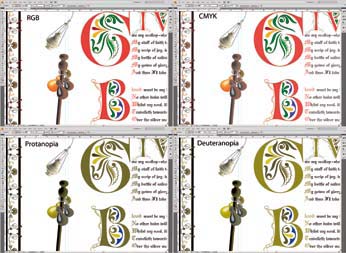
The rarity of Illustrator gives the skilled user an advantage in a mixed photography/design department of a larger company (typified by teaching hospitals, illustration departments, and university departments) – they all need graphs, posters and presentation graphics on a regular basis. Sometimes crazy academics need protection from their own ghastly offerings in PowerPoint! For those involved in this type of work, which often includes material for display in the public sector, CS4 has also implemented a proofing system for testing your design against the problems associated with colour-deficient sight. You can now soft proof for either protanopia or dueteranopia in both Photoshop and Illustrator (but not as far as we can tell, in InDesign or Acrobat). This is part of a drive for inclusiveness for people with disabilities associated with vision and hearing, something the major software houses have taken on-board (it is in fact a legal requirement for web design that has not (yet) been very vigorously implemented).
'Illustrator is complex with more panels than Photoshop. The similarities in the interface make it easy to follow your way around but you still need to know which tools do what task!'
One feature of Illustrator that is routinely useful is 'Live Trace' with which you can create vector logos from poor quality or web-sized originals. Using the low resolution image as a guide you can rapidly redraw a logo. We have used it commercially for advertisements, logos for adding to images and schools photography (eg school crest on each image, the schools never have a vector logo in our experience!) – once you are skilled in the art it is surprising how often you are called upon to use it!
Kuler Support
We have spoken of Kuler before. For newer readers, it is a way of creating a 5-colour palette of harmonised tones according to a selectable choice of harmony rules. It was originally web-based (and still is) but the basic functionality has been built in to CS4. However if you still need some inspiration from the colour palettes of others, the software will take you straight to the Kuler website and you can keyword search for your chosen theme. Although it is a great tool for graphic designers you can also bring it into play as a photographer if you are designing wedding albums or even posters for your work. The only downside we can see is that the software-based version is limited to RGB. Designers wish to use CMYK and you have to go off to the web to get the 'generate' facility that allows you to specify your colour in CMYK. Failing that you can also go to either InDesign or Illustrator and perform more sophisticated colour control. However, at Professional Imagemaker we often drop into Photoshop to do page backdrops with tricky ornamentation (eg drop shadows and fancy blends) and so it would have been nice to have the colour-editing strength in Photoshop for when we need to add correctly coloured page furniture.
Page 1 : Page 2 :
Page 3 : Page 4 :
Page 5 : Page 6 :
Page 7
Find the Membership package for you:

Society of International Media & Press Photographers (SIMPP) is a trading name of BPPA Ltd
Clwyd Chambers, Clwyd Street, Rhyl, Denbighshire, LL18 3LA, UK
BPPA Ltd Company Reg 0392 2894
VAT number 790 4289 05
Tel: 01745 356935
Corporate Partners



Newsletter
Subscribe to the Societies Newsletter. Subscribe here.
Privacy. - Partner Societies - London Photography & Video Show - Europe's Largest 'All-Welcome' Photographic Convention